Using models by API
Calling a hosted model by API is the fastest way to start using Ai2’s Olmo models. There's no hardware to manage and you only pay for the tokens you use. Ai2 models are available on OpenRouter, or directly through our inference providers Cirrascale and Parasail.
This Quick Start covers everything you need to make your first API call using Python or TypeScript, including environment setup, authentication, sending a test request, and printing the model’s response.
OpenRouter
Prerequisites
Before you start, make sure you have the following:
- An OpenRouter API key. You can generate a new key from your OpenRouter Keys page.
- A development environment with either Python or Node.js installed.
1. Set up your project
First, prepare your development environment by installing the OpenAI client library.
- Python
- TypeScript
If you want to use Python, install the official openai library using pip.
pip install openai
If you want to use TypeScript, initialize a Node.js project and install the necessary packages.
# Initialize a Node.js project
npm init -y

# Install the OpenAI client
npm install openai

# Install TypeScript and its Node.js types
npm install -D typescript @types/node
Next, create a tsconfig.json file in your project directory to configure the TypeScript compiler. This setup compiles your code into a dist folder.
tsconfig.json
{
  "compilerOptions": {
    "target": "ES2022",
    "module": "NodeNext",
    "moduleResolution": "NodeNext",
    "outDir": "./dist",
    "esModuleInterop": true,
    "strict": true
  },
  "include": ["*.ts"]
}
TypeScript note: Because this setup uses ES modules (module: "NodeNext"), add "type": "module" to your package.json so Node can run the compiled files using import syntax.
package.json (snippet)
{
  "name": "my-project",
  "version": "1.0.0",
  "type": "module",
  "scripts": {
    "build": "tsc",
    "start": "node dist/test_openrouter.js"
  }
}
OpenRouter provides OpenAI-compatible endpoints, which means you can use OpenAI's official client libraries and API structure to interact with Olmo models.
2. Set your API key
For security, set your API key as an environment variable in your terminal. Both the Python and TypeScript scripts will read this variable to authenticate your calls.
export OPENROUTER_API_KEY="YOUR_KEY_HERE"
3. Create the test script
Now, create a script to initialize the client and call the Olmo API via OpenRouter.
- Python
- TypeScript
Create a file named test_openrouter.py. This script sends a prompt to the allenai/olmo-3-32b-think model:
test_openrouter.py
import os
from openai import OpenAI

# Initialize the client with your key and the OpenRouter base URL
client = OpenAI(
    base_url="https://openrouter.ai/api/v1",
    api_key=os.environ.get("OPENROUTER_API_KEY"),
)

print("Sending request to Olmo model via OpenRouter...")

# Send a request to the Olmo chat model
response = client.chat.completions.create(
    model="allenai/olmo-3-32b-think",
    messages=[
        {
            "role": "user",
            "content": "What are 5 things to do in Seattle?",
        }
    ],
)

# Print the model's response
print("\n--- Model Response ---")
print(response.choices[0].message.content)
Create a file named test_openrouter.ts.
test_openrouter.ts
import OpenAI from 'openai';

// This function wraps our async API call.
async function main() {
  // Initialize the client with your key and the OpenRouter base URL
  const client = new OpenAI({
    baseURL: 'https://openrouter.ai/api/v1',
    apiKey: process.env.OPENROUTER_API_KEY,
  });

  console.log('Sending request to Olmo model via OpenRouter...');

  // Send a request to the Olmo chat model
  const response = await client.chat.completions.create({
    model: 'allenai/olmo-3-32b-think',
    messages: [
      {
        role: 'user',
        content: 'What are 5 things to do in Seattle?',
      },
    ],
  });

  // Print the model's response
  console.log('\n--- Model Response ---');
  console.log(response.choices[0].message.content);
}

// Execute the main function to run the script.
main();
To ensure you are using a valid model name, check the official OpenRouter Models page or use the OpenRouter API to get a list of available models. OpenRouter uses a provider/model-name format (e.g., allenai/olmo-3-32b-think), and this page provides the exact identifiers for all available models.
For more details on features like routing, fallbacks, and usage metrics, please refer to the official OpenRouter Documentation.
4. Execute the test
Finally, run your script from the terminal to get a response from the model.
- Python
- TypeScript
Execute the Python script by running:
python test_openrouter.py
First, compile the TypeScript file into JavaScript using tsc. Then, run the compiled file from the dist directory with node.
# Compile the .ts file
npx tsc

# Run the compiled .js file
node dist/test_openrouter.js
You should see a list of five things to do in Seattle printed to your console, as the following example output illustrates:
Sending request to Olmo model via OpenRouter...

--- Model Response ---
1. Visit Pike Place Market: A bustling marketplace with unique shops, fresh produce, and seafood. Don't miss the iconic salmon toss at Pike Place Fish Market.

2. Explore the Seattle Aquarium: Get up close with seals, octopuses, and a mangrove forest exhibit while learning about the diverse marine environments around Seattle.

3. Experience the Space Needle: ascend to the top for stunning 360-degree views of the city and surroundings. Enjoy a rotating restaurant if you wish to have a meal with a view.

4. Wander the Seattle Art Museum (SAM) and Museum of Pop Culture (MoPOP): SAM hosts modern and contemporary art, while MoPOP explores popular culture through music, sci-fi, and fantasy exhibitions.

5. Hike at Discovery Park: Enjoy over 520 acres of natural landscapes and trails, home to magnificent views, historical military sites, and a lighthouse. Great for photography and picnics.

Enjoy exploring Seattle's rich culture, natural beauty, and delicious cuisine!
Cirrascale
Prerequisites
Before you start, make sure you have the following:
- A Cirrascale API key and the endpoint to access the API. You can generate a new key and get the endpoint URL from your Cirrascale account console.
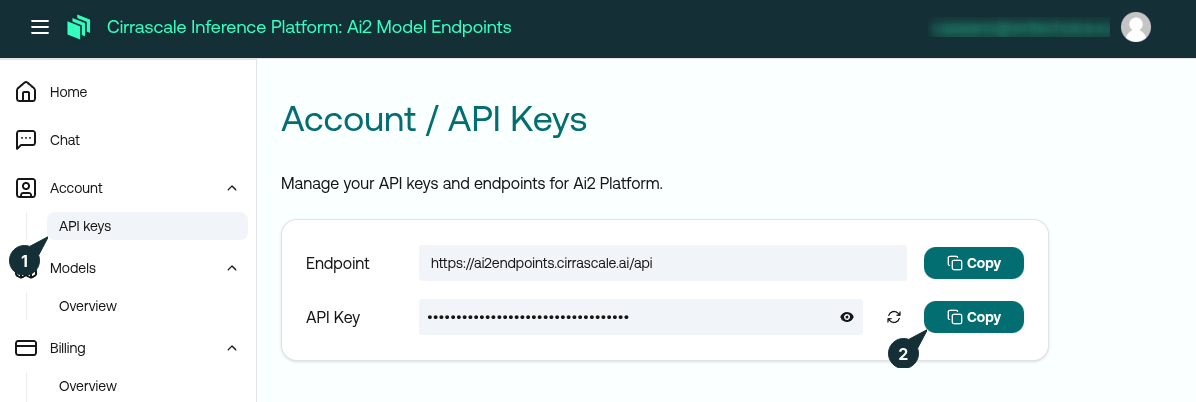
- A development environment. You need either Python or Node.js with TypeScript installed.
1. Set up your project
First, prepare your development environment by installing the OpenAI client library.
- Python
- TypeScript
Install the official openai library using pip.
pip install openai
First, initialize a Node.js project and install the necessary packages.
# Initialize a Node.js project
npm init -y

# Install the OpenAI client
npm install openai

# Install TypeScript and its Node.js types
npm install -D typescript @types/node
Next, create a tsconfig.json file in your project directory to configure the TypeScript compiler. This setup compiles your code into a dist folder.
tsconfig.json
{
  "compilerOptions": {
    "target": "ES2022",
    "module": "NodeNext",
    "moduleResolution": "NodeNext",
    "outDir": "./dist",
    "esModuleInterop": true,
    "strict": true
  },
  "include": ["*.ts"]
}
Cirrascale provides OpenAI-compatible endpoints, which means you can use OpenAI's official client libraries and API structure to interact with Olmo models.
2. Set your API key
For security, set your API key as an environment variable in your terminal. Both the Python and TypeScript scripts will read this variable to authenticate your calls to the Cirrascale API.
export CIRRASCALE_API_KEY="YOUR_KEY_HERE"
3. Create the test script
Now, create a script to initialize the client and call the Olmo API.
- Python
- TypeScript
Create a file named test_olmo.py. This script sends a prompt to the OLMo-2-0325-32B-Instruct model and prints its response.
test_olmo.py
import os
from openai import OpenAI

# Initialize the client with your key and the Cirrascale base URL
client = OpenAI(
    api_key=os.environ.get("CIRRASCALE_API_KEY"),
    base_url="https://ai2endpoints.cirrascale.ai/api",
)

print("Sending request to Olmo model...")

# Send a request to the Olmo chat model
resp = client.chat.completions.create(
    model="OLMo-2-0325-32B-Instruct",
    messages=[{"role": "user", "content": "What are 5 things to do in Seattle?"}]
)

# Print the model's response
print("\n--- Model Response ---")
print(resp.choices[0].message.content)
Create a file named test_olmo.ts. This script sends a prompt to the OLMo-2-0325-32B-Instruct model and prints its response.
test_olmo.ts
import OpenAI from 'openai';

// Initialize the client with your key and the Cirrascale base URL
const client = new OpenAI({
  apiKey: process.env.CIRRASCALE_API_KEY,
  baseURL: 'https://ai2endpoints.cirrascale.ai/api', //
});

async function main() {
  console.log('Sending request to Olmo model...');

  // Send a request to the Olmo chat model
  const resp = await client.chat.completions.create({
    model: 'OLMo-2-0325-32B-Instruct', //
    messages: [{ role: 'user', content: 'What are 5 things to do in Seattle?' }],
  });

  // Print the model's response content
  console.log('\n--- Model Response ---');
  console.log(resp.choices[0].message.content);
}

// Execute the main function to run the script.
main();
To ensure you are using a valid model name, you can get a complete list by sending a GET request to https://ai2endpoints.cirrascale.ai/api/models with your API key. The response will show all model IDs available for use.
Because the Cirrascale API is OpenAI-compatible, the official OpenAI API documentation is an excellent resource for understanding request parameters like temperature, top_p, and streaming options.
4. Execute the test
Finally, run your script from the terminal to get a response from the model.
- Python
- TypeScript
Execute the Python script directly.
python test_olmo.py
First, compile the TypeScript file into JavaScript using tsc. Then, run the compiled file from the dist directory with node.
# Compile the .ts file
npx tsc

# Run the compiled .js file
node dist/test_olmo.js
You should see a list of five things to do in Seattle printed to your console, as the following example output illustrates:
Sending request to Olmo model...

--- Model Response ---
1. Space Needle: For an unmatched panoramic view of Seattle and various attractions, a trip to the Space Needle is a must. Reserved tables at Loupe Bar & Terrace, located at the top, offer an exclusive atmosphere for enjoying drinks with a view.

2. Seattle Art Museum (SAM) and Olympic Sculpture Park: Explore SAM's extensive collection consisting of American, European, and Asian art spanning centuries. Just outside, the Olympic Sculpture Park provides an exciting and serene outdoor experience featuring sculptures from internationally recognized artists.

3. Pike Place Market: The famous market is known for its fresh flowers, seafood, and produce. Be sure to check out the original Starbucks at Pike Place and watch the iconic flying fish at the Pike Place Fish Market, where the staff toss fish for customer orders.

4. Museum of Pop Culture (MoPOP): Explore the museum's exhibits dedicated to popular culture, including music, sci-fi, games, and more. The museum features interactive exhibits that appeal to all ages.

5. Chihuly Garden and Glass: Visit this stunning glass exhibit and enjoy Dale Chihuly's remarkable glass installations both indoors and out. Experience the breathtaking, colorful displays of glass art during sunset for an especially magical experience.

Each of these attractions offers unique experiences that showcase Seattle's unique character and attractions.
For more details on quotas, rate limits, and billing, please refer to the official Cirrascale API Reference.
Parasail
Prerequisites
Before you start, make sure you have the following:
- A Parasail API key. You can generate a new key by creating an account on the Parasail platform and navigating to your Parasail API Keys page.
- A development environment with either Python or Node.js installed.
1. Set up your project
First, prepare your development environment by installing the OpenAI client library.
- Python
- TypeScript
If you want to use Python, install the openai library using pip.
pip install openai
If you want to use TypeScript, initialize a Node.js project and install the necessary packages.
# Initialize a Node.js project
npm init -y

# Install the OpenAI client
npm install openai

# Install TypeScript and its Node.js types
npm install -D typescript @types/node
Next, create a tsconfig.json file in your project directory to configure the TypeScript compiler. This setup compiles your code into a dist folder.
tsconfig.json
{
  "compilerOptions": {
    "target": "ES2022",
    "module": "NodeNext",
    "moduleResolution": "NodeNext",
    "outDir": "./dist",
    "esModuleInterop": true,
    "strict": true
  },
  "include": ["*.ts"]
}
Parasail provides OpenAI-compatible endpoints, which means you can use OpenAI's official client libraries and API structure to interact with Olmo models.
2. Set your API key
For security, set your API key as an environment variable in your terminal. Both the Python and TypeScript scripts will read this variable to authenticate your calls.
export PARASAIL_API_KEY="YOUR_KEY_HERE"
3. Create the test script
Now, create a script to construct the API request and call the Olmo API via Parasail.
- Python
- TypeScript
Create a file named test_parasail.py. This script sends a prompt to the Olmo-3-32B-Think model.
test_parasail.py
import os
from openai import OpenAI

# The client uses the API key from your environment and the specific Parasail URL.
client = OpenAI(
    api_key=os.environ.get("PARASAIL_API_KEY"),
    base_url="https://api.parasail.io/v1",
)

print("Sending request to Olmo model...")
# This sends a request to the Olmo chat model.
resp = client.chat.completions.create(
    model="Olmo-3-32B-Think",
    messages=[{"role":"user","content":"What are 5 things to do in Seattle"}]
)

print("--- Model Response ---")
print(resp.choices[0].message.content)
Create a file named test_parasail.ts.
test_parasail.ts
import OpenAI from 'openai';

// Initialize the client with the API key from your environment and the base URL.
const client = new OpenAI({
  apiKey: process.env.PARASAIL_API_KEY,
  baseURL: 'https://api.parasail.io/v1',
});

async function main() {
  console.log('Sending request to Olmo model...');

  // This sends a request to the chat completions endpoint
  const resp = await client.chat.completions.create({
    model: 'Olmo-3-32B-Think',
    messages: [{ role: 'user', content: 'What are 5 things to do in Seattle' }],
  });

  // Print the model's response content.
  console.log('\n--- Model Response ---');
  console.log(resp.choices[0].message.content);
}

// Execute the main function to run the script.
main();
4. Execute the test
Finally, run your script from the terminal to get a response from the model.
- Python
- TypeScript
Execute the Python script by running:
python test_parasail.py
First, compile the TypeScript file into JavaScript using tsc. Then, run the compiled file from the dist directory with node.
# Compile the .ts file
npx tsc

# Run the compiled .js file
node dist/test_parasail.js
You should see a list of five things to do in Seattle printed to your console, as the following example output illustrates:
Sending request to Olmo model...

--- Model Response ---
1. **Pike Place Market**: Explore one of the oldest farmers' markets in the US. Pike Place Market is a vibrant area with fresh produce, seafood, flowers, and local crafts. Don't miss the fish throwing at the famous Pike Place Fish Market.

2. **Chihuly Garden and Glass**: Visit Dale Chihuly's incredible glass sculptures at the Chihuly Garden and Glass, which showcases stunning, colorful installations.

3. **Space Needle**: For panoramic views of Seattle, head up to the top of the Space Needle – the ultimate Seattle landmark. The observation deck provides views of the Cascade and Olympic Mountains, Elliott Bay, and the city skyline.

4. **Seattle Art Museum (SAM)**: The Seattle Art Museum is a leading museum with a diverse collection of art from various cultures. The SAM is a must-visit for art lovers, with regular exhibitions, educational programs, and captivating galleries.

5. **Woodland Park Zoo**: For a family-friendly outing, visit the Woodland Park Zoo. This award-winning zoo is known for its naturalistic animal exhibits and conservation efforts. Highlights include the Fur Ball Festival and Pumpkin Smash, depending on the season.

Additionally, it's crucial to note seasonal events and festivals, as Seattle hosts many including Bumbershoot, Northwest Folklife Festival, and Cherry Blossom Festival, which would add more to your experience depending on when you visit. Also, exploring the nearby Olympic National Park or venturing to the famous Fremont neighborhood could add more to your visit.
For more details on batch jobs, classic completions, and other advanced workflows, please refer to the official Parasail Documentation.